


Download BurnQuick Data/Audio CD/DVD Burner – burn data cd, burn audio cd, burn dvd, create disc, copy disc, disc utility, cd burner, dvd burner, data backup, disc management, burn iso, iso burner, disc eraser, disc spanning, right-click burner
Overview
BurnQuick Data/Audio CD/DVD Burner is a lightweight utility designed to simplify the creation, copying, and management of CDs and DVDs directly from a Windows environment. The application focuses on streamlining disc-related tasks through intuitive access and straightforward functionality. Its primary purpose is to assist users in burning data and audio content, backing up digital files, and duplicating existing discs without requiring complex configurations or technical expertise.
Target users include individuals managing personal media libraries, students preserving academic projects, and professionals needing to distribute files via physical media. The software addresses common pain points such as difficulty accessing burning tools, fragmented workflows, and the need for additional third-party software. By integrating with Windows Explorer and offering right-click access, BurnQuick reduces friction in the disc creation process, enabling users to initiate tasks with minimal effort.
Developed by Triton Interactive, the application has been maintained through regular updates, ensuring compatibility with evolving operating systems. Version 4.9.2, for instance, resolved installer issues on older systems and improved support for large ISO files. This ongoing development reflects a commitment to usability and reliability. In the broader software ecosystem, BurnQuick occupies a niche role as a no-frills, efficient disc utility, filling a gap left by more complex or bloated alternatives.
Key Features & Functionality
- Right-Click Accessibility: BurnQuick integrates directly into Windows Explorer and My Computer, allowing users to initiate burning tasks with a simple right-click. This eliminates the need to open a separate application window, making it ideal for quick file or folder burns.
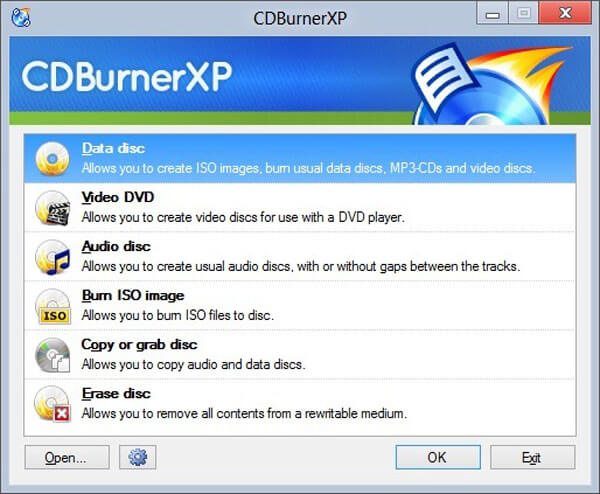
- Streamlined Interface: The interface consolidates data and audio CD/DVD creation into a single workflow. Users can select disc type and content with minimal navigation, reducing cognitive load and enabling faster execution.
- Built-In Disc Eraser: For rewritable discs, BurnQuick includes a disc eraser tool that allows users to delete unwanted data and reclaim space, enhancing disc reusability and organization.
- Disc Spanning: Large files can be split across multiple discs using the disc spanning feature. This is particularly useful for backing up large datasets or distributing content that exceeds the capacity of a single disc.
- Disc Copying: The software enables direct duplication of existing CDs and DVDs, supporting both data and audio discs. This feature is valuable for creating backups or sharing content with others.
- ISO Support: BurnQuick supports ISO images larger than 4 GB, allowing users to burn large software distributions or system images without compatibility limitations.
For example, a user preparing a presentation can right-click a folder, select BurnQuick, and create a data disc in seconds. Similarly, a musician can burn an audio CD directly from a playlist, while a student can split a large project file across multiple discs using the spanning feature. These real-world applications highlight BurnQuick’s practicality and versatility.
Interface, UX & Performance
BurnQuick presents a clean, minimal interface focused on core functionality. The layout emphasizes ease of access, with clear visual cues and straightforward options for disc type selection. Navigation is intuitive, relying on a linear workflow that guides users from file selection to burn initiation.
Although the developer did not list formal performance metrics, the application’s lightweight nature—only 3.5 MB in size—suggests efficient resource usage. It is likely to perform well on a wide range of Windows devices, from older systems to modern machines. The right-click integration ensures fast access, minimizing startup delays.
Responsiveness appears to be optimized for common user tasks, with minimal lag during file selection and burn preparation. Stability is supported by regular updates, including bug fixes for DVD disc spanning and installer compatibility. The developer did not provide additional technical details about error handling or crash recovery, but the consistent release history indicates ongoing maintenance and reliability.
Platform Compatibility & Technical Requirements
BurnQuick Data/Audio CD/DVD Burner is designed for the Windows platform. The application is compatible with Windows operating systems, though specific version requirements were not listed. The software has a file size of 3.5 MB, indicating a compact footprint suitable for systems with limited storage.
The developer did not specify minimum OS requirements or hardware prerequisites. However, given its lightweight design and integration with Windows Explorer, it is likely to function on systems running Windows 7 and later, including modern Windows 10 and 11 environments. Compatibility with different disc drives and media types is assumed based on standard Windows disc burning capabilities.
Pros and Cons
- Lightweight and fast to install and use
- Seamless integration with Windows Explorer via right-click menu
- Supports both data and audio disc creation
- Built-in disc eraser for rewritable media
- Disc spanning enables large file distribution across multiple discs
- Regular updates ensure ongoing compatibility and stability
- Free to download and use
- Specific OS requirements were not disclosed
- No advanced customization options for burn settings
- Limited to Windows platform
- Does not support Blu-ray disc burning
- Interface is minimal, which may lack visual feedback for some users
FAQ
Is BurnQuick safe to download and install?
BurnQuick is a free utility developed by Triton Interactive. The application is distributed without known malware or intrusive behavior. Users should ensure they download from official or trusted sources to maintain security.
Can I use BurnQuick to burn ISO files?
Yes, BurnQuick supports ISO images larger than 4 GB, allowing users to burn standard and large disc images directly to CDs or DVDs.
Does BurnQuick work on Windows 10 and Windows 11?
While specific compatibility details were not provided, the software is designed for Windows and has been updated to support modern systems. It is expected to function on Windows 10 and 11.
Is BurnQuick available for macOS or Linux?
BurnQuick is currently available only for Windows. There is no official version for macOS or Linux.
How often are updates released?
BurnQuick receives regular updates to fix bugs, improve compatibility, and add new features. Version 4.9.2 included fixes for installer issues and DVD spanning, indicating active development.
Final Thoughts
BurnQuick Data/Audio CD/DVD Burner delivers a focused, efficient solution for users who need to create, copy, or manage discs without complexity. Its right-click integration, lightweight design, and support for key features like disc spanning and erasing make it a practical tool for data backup, media distribution, and file sharing. While it lacks advanced customization and is limited to Windows, its simplicity and reliability stand out in a crowded utility space.
For students, professionals, and casual users seeking a no-fuss disc burner, BurnQuick offers excellent value—especially as a free tool. It fills a critical gap in everyday digital workflows where physical media remains relevant.
Download BurnQuick now


